Design Home™: House Makeover
- 4.3
- Rating
- 50.00M
- Installs
- Free
- Price

 Analysis by App-foxy
I approached Design Home™ as a relaxing decorating game rather than a serious interior-design tool, and that distinction matters. It gives me a series of homes, rooms, gardens, and styling decisions to work through, then lets me build a finished look from the available choices. The appeal is immediate: I can make a plain space feel personal without needing to understand professional design software.
Created by Crowdstar Inc, this simulation game is free to start and suitable for Everyone. It has reached over 50 million installs and holds a 4.3 average from around 1.2 million ratings, which matches my impression that it has a broad, long-running audience. I would recommend it to someone who enjoys visual creativity in short sessions, especially if arranging furniture feels more satisfying than competing in a traditional game.
How the decorating experience feels in everyday use
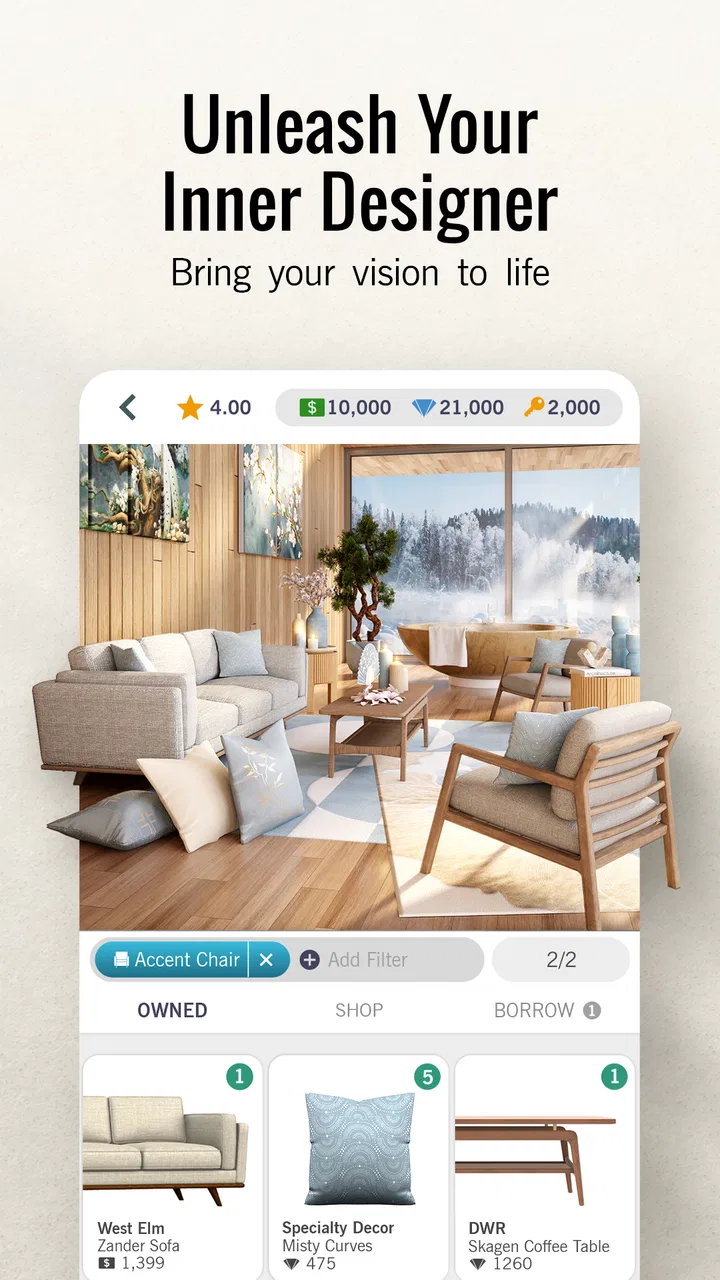
The basic rhythm is easy to understand. I enter a design task, look at the room, choose furniture and decorative pieces, and try to create a coherent result. The fun comes from making decisions within the room’s shape and apparent purpose. A bedroom asks for a different mood from a garden, and a living area gives me more space to balance than a smaller room.
You May Also Like

 Blood Strike: 2.5 Anniversary
Blood Strike’s Loadouts Turn Every Drop Into a Tactical Gamble
A close look at Blood Strike’s custom loadouts: how fast access to signature weapons reshapes its battle royale rhythm, rewards preparation, and narrows the gap between fights.

 Pandora - Music & Podcasts
Pandora’s Music Is Easy to Start, but Harder to Recover
Pandora’s strength is its low-effort path from a seed to a station. Its weak spot is how much confidence it asks you to place in connection, setup, and quiet recovery.

 8 Ball Pool
 Is Built on Rivalries, Rematches, and Routine
A close look at the rivalries, rematches, shared routines, and unanswered safety questions that turn a quick pool match into a persistent mobile community.

 Samsung Music
’s Quiet Strength Is Playing What You Already Own
Its reach comes less from spectacle than from dependable access to a personal library. That simplicity is both the app’s strongest retention engine and its ceiling.

 AccuWeather: Weather Radar
AccuWeather Review: A Quick, Clear Forecast for Everyday Decisions
For everyday plans, the best forecast is the one you can understand quickly. AccuWeather makes rain timing, radar, and local conditions easy to act on, with a few trade-offs.

 Hill Climb Racing
Why Hill Climb Racing Still Turns Crashes Into One More Run
A tiny car, a bumpy hill and one more upgrade: Hill Climb Racing keeps resurfacing because its simple chaos makes every near-miss feel personal.
More From Our News Desk



That simplicity makes the game approachable, but it also means the experience depends heavily on whether I enjoy visual judgement. There is no deep story carrying me forward, and I do not play it for reflexes or exploration. I play it to compare colors, textures, furniture proportions, and the overall feeling of a completed space.
One useful way to approach each challenge is to choose a central idea before touching the furniture. For example, I might decide that a room should feel warm and natural, then avoid adding unrelated pieces just because they are attractive on their own. This is more effective than filling every space with expensive-looking objects. A consistent palette usually makes a stronger impression than a collection of individually striking items.
The strongest part of the game is the small decision-making loop: I can make a room feel balanced, notice where it looks empty, and revise the arrangement without needing a long tutorial. That makes it a good fit for a quick break. I can complete a little decorating session while waiting for an appointment or winding down before bed, then stop without losing the casual nature of the experience.
What makes the progression satisfying
Designing a room gives me a clear visual payoff. Instead of receiving only a number or a generic reward, I get to see the result of my choices as a finished composition. That matters in a simulation game built around decoration. The satisfaction is not just in completing a task; it is in recognizing that the room now has a deliberate identity.
I also like that the game encourages me to think in layers. Large furniture establishes the structure, smaller items add personality, and the final touches determine whether the space feels complete or cluttered. A practical tip is to solve the biggest visual problem first. If the main seating or bed feels wrong, changing a small accessory will not rescue the room.
There is a trade-off here. Players who want complete freedom may find the available choices restrictive compared with a full design sandbox. The game is about making the best-looking solution from the options in front of me, not building every object from scratch or moving through a fully simulated house. That limitation keeps the sessions manageable, but it can frustrate anyone looking for unrestricted construction.
Speed expectations during normal play
My expectation for speed would be modest and sensible. This is a visually focused mobile game, so the experience is naturally more demanding than a simple puzzle with static screens. Room scenes contain enough visual detail that loading and transitions are part of the experience, particularly when I move between decorating tasks or inspect a finished space.
On a capable recent phone, I would expect the game to feel most comfortable during ordinary browsing and decorating. On an older device, the visual presentation may make the experience feel less immediate, especially when several detailed elements are being displayed together. I would not choose this title specifically for instant response or ultra-light resource use; its attraction comes from seeing the room clearly.
A practical habit helps: I avoid opening it immediately after switching between several demanding apps. Closing unused apps first can make any visually rich mobile game feel more consistent, particularly on a phone with limited memory. This is not a special trick that changes the game itself, but it can reduce the feeling that the device is struggling while I move through the design screens.
The current version is 1.128.079, and the game supports Android 7.0 or later. That gives it a wide compatibility range, although compatibility alone does not guarantee the same smoothness on every phone. A newer operating system may run it on older hardware, but the age and capability of the device still matter when a game relies on detailed visual scenes.
What happens during heavier sessions
The heaviest moments are likely to come when I spend a long time moving through multiple rooms, reviewing designs, and repeatedly changing selections rather than completing one quick task. Extended sessions put more pressure on the phone than a short visit, simply because the game keeps me looking at detailed content for longer.
This is where I pay attention to heat, battery use, and whether the phone begins to feel less responsive. I would not describe the game as a lightweight utility that disappears into the background. A decorating game needs to present furniture and rooms attractively, so some resource demand is a reasonable trade-off for the visual experience.
My preferred workflow is to separate browsing from designing. First, I look over the room and decide on a style. Then I make the major selections, followed by small decorative adjustments. This reduces unnecessary back-and-forth and makes a session feel faster because I am not repeatedly reopening the same choices without a plan. It also helps conserve battery compared with endlessly experimenting with every possible combination.
Another useful trade-off is detail versus speed of decision. I can spend a long time comparing similar items, but the difference between them may be less important than the room’s overall balance. When I am playing casually, I make one strong choice and continue. When I am deliberately chasing a polished result, I accept that the session will take longer.
Stability and recovering from interruptions
Reliability matters more to me in a game like this than it might seem. A decorating session can involve several small decisions, so an interruption is annoying if I have to reconstruct what I was doing. I treat it as a mobile game that should be played with ordinary caution: if I am about to leave the app for a call or another task, I finish the current step when possible rather than abandoning it halfway through.
Android may pause or remove an app from memory when the phone needs resources. That is a device behavior rather than a unique claim about this game, but it is relevant to how I use it. On a phone with limited memory, returning after a long interruption may be less predictable than returning immediately. I would therefore avoid beginning a complicated decorating session when I know I will need to switch apps repeatedly.
If the game needs to be reopened, I would first give it a moment to restore its normal screen instead of tapping repeatedly. Rapidly pressing buttons during a slow return can make a short delay feel worse. I also prefer to complete one room-related action at a time, because that makes it easier to remember where I stopped if the session is interrupted.
The game’s long presence on mobile and its large audience suggest that it is not an obscure experiment, but popularity is not the same as perfect stability on every device. My honest view is that reliability should be judged alongside the phone’s age, available storage, operating system, and background workload. Someone using a basic or older handset should keep expectations realistic.
Device limits and the cost of playing comfortably
The minimum Android requirement is 7.0, which makes the game accessible to many older devices. Still, I would not confuse a minimum operating-system requirement with a promise of identical performance across all supported hardware. A phone that technically qualifies may offer a less comfortable experience than a newer model with more capable graphics and memory.
Storage is another everyday consideration. A game centered on rooms, furniture, and visual presentation needs space for its application data and ongoing operation. I keep some free storage available rather than letting my phone become completely full. A crowded device can make updates and general app behavior more frustrating, regardless of the individual game.
Screen size also affects enjoyment. On a compact phone, small decorative details can be harder to judge, and comparing similar furniture may require more concentration. A larger display makes it easier for me to assess the room as a whole, although it does not automatically make my design choices better. The game remains playable on a smaller screen, but the visual side benefits from more room.
I would also consider battery habits. Short sessions are the safest choice when I am away from a charger. If I plan to decorate for a long stretch, I reduce other background activity and avoid treating the phone as if it were running a simple card game. That is a fair compromise for a title whose main pleasure comes from detailed rooms rather than minimal graphics.
Free access, purchases, and the patience factor
The game is free to download and play, but it includes in-app purchases ranging from $0.99 to $199.99 per item. That range is important for families and for anyone who tends to spend impulsively in mobile games. I would set a purchase boundary before playing, especially because decorating naturally encourages me to want one more item to complete a particular look.
I find the free entry useful because it lets me discover whether the design loop suits me before spending anything. The right question is not whether every desirable option is immediately available; it is whether I am comfortable enjoying the game within its free progression. If I dislike waiting, limited choices, or the temptation to buy, this may not be the right simulation game for me.
My advice is to treat purchases as optional decoration rather than a requirement for personal creativity. I can still practice color coordination, spacing, and visual hierarchy with the choices available. In fact, restrictions can improve the challenge: working within a smaller selection forces me to solve the room instead of simply choosing the most obvious premium-looking item.
For younger players, the Everyone rating makes the theme broadly approachable, but adults should still pay attention to purchase controls on the device. A child who enjoys decorating may not understand the difference between an attractive in-game option and a real charge. The rating describes the content audience, not a substitute for sensible spending supervision.
How it compares with other decorating games
Compared with a construction-focused simulation, Design Home™ feels more curated and less like a full building system. I am evaluating interior choices rather than managing a large world, complex characters, or detailed economic systems. That makes it easier to pick up for ten minutes, but it offers less freedom for players who want to design an entire environment from the ground up.
Compared with a pure matching or puzzle game, it asks for more subjective judgement. There is no single obvious correct move in the way there might be in a logic puzzle. I need to decide whether colors work together, whether furniture suits the room, and whether the final arrangement feels intentional. That uncertainty is part of its charm, though players who prefer clear rules may find the evaluation less satisfying.
It also differs from professional interior-design software. I would not use it to plan a real renovation, calculate measurements, or test whether furniture fits my actual home. Its value is imaginative and recreational. It helps me explore visual combinations, but it should not replace a tool designed for accurate floor plans or real purchasing decisions.
For me, the best alternative depends on the goal. If I want a calm visual hobby with room-by-room decisions, this game is a strong choice. If I want unrestricted building, a deeper life simulation, or practical remodeling measurements, I would look elsewhere. The game succeeds because it stays focused, not because it tries to cover every kind of design experience.
Who will enjoy it, and who should skip it
I think it suits players who like arranging spaces, comparing styles, and seeing an immediate before-and-after effect. It is especially comfortable for someone who wants a low-pressure mobile activity rather than a competitive action game. A person who enjoys mood boards, furniture browsing, or experimenting with color combinations will probably understand the appeal quickly.
It is also useful for casual creative practice. I sometimes use a challenge to test whether a neutral room needs one strong accent or several smaller touches. That is not professional training, but it encourages me to notice proportion and visual clutter. The game gives those observations a playful setting.
I would skip it if I need a completely open-ended builder, dislike in-app purchase pressure, or want a game with a strong narrative and constant action. I would also be cautious if my phone is old, nearly full, or prone to closing demanding apps. The minimum Android version is helpful, but a device that barely meets the software requirement may not provide the most comfortable experience.
Players who want to play offline should also think carefully about their expectations before committing to it as a travel companion. I would not assume that every part of a modern, content-rich mobile game behaves identically without a connection. For dependable travel entertainment, I prefer games explicitly built around offline access.
My practical routine for getting better results
I begin by scanning the room from the largest elements to the smallest. First I decide what should dominate the space, then I choose supporting pieces, and only after that do I add accents. This prevents a common mistake: selecting attractive accessories early and discovering later that the main furniture no longer fits the intended mood.
I also compare warmth and contrast deliberately. A room filled with similar pale tones can feel calm but flat, while too many contrasting colors can make it noisy. One repeatable approach is to choose a main neutral, a secondary material or color, and one accent. I do not follow that formula rigidly, but it gives me a useful starting point when the choices feel overwhelming.
When I am unsure between two items, I ask which one improves the room from a distance. Tiny details can look impressive while I am examining them closely, yet disappear in the completed view. The stronger choice is often the piece that improves the silhouette, balance, or focal point of the whole room.
Finally, I take a short pause before submitting or finishing a design. Looking at the room again after a few seconds helps me notice clutter, empty corners, or a color that appears too often. That pause is more valuable than constantly changing items at random, and it makes the game feel more like a creative exercise than a shopping list.
Final performance and enjoyment verdict
Design Home™ works best when I treat it as a visually rich, casual simulation rather than a demanding design utility or a fast arcade game. Its room-based format is easy to understand, its creative decisions are accessible, and its finished spaces provide a satisfying sense of completion. The free price makes trying it straightforward, while the broad Everyone rating makes the theme approachable for a wide audience.
Performance depends on the device more than the simple decorating concept might suggest. Newer phones should be the safer choice for longer sessions, while older or crowded devices may make loading, switching, heat, or battery use more noticeable. I would keep the app updated, leave storage available, and play in shorter sessions if my phone is modest.
The main friction is the balance between creative freedom, available choices, and optional purchases. The game does not replace a full interior-design application, and it may not satisfy someone who wants unrestricted building. However, those limits also keep the experience focused enough for everyday play.
After spending time with it, I would recommend it to a friend who enjoys decorating and wants a calm mobile hobby with visible results. I would explain the purchase range clearly and suggest trying the free experience before spending. If that combination of visual creativity, manageable sessions, and device-dependent performance sounds appealing, Design Home™ is worth installing; if you need deep construction systems or guaranteed light performance, another category of game will serve you better.
FAQs for Design Home™: House Makeover
01What is the main objective of Design Home™: House Makeover?
Design Home™: House Makeover is a game that allows you to unleash your interior design creativity. The main objective is to design and furnish virtual rooms using real-world furniture and decor items. Players complete design challenges to earn rewards and unlock new items, enhancing their design portfolio.
02Can I play Design Home™: House Makeover offline?
No, Design Home™ requires an internet connection to play. The game needs to connect to its servers to download new design challenges, update the in-game store with the latest furniture collections, and allow social interactions with other players.
03Are there in-app purchases in Design Home™: House Makeover?
Yes, the game offers in-app purchases. Players can buy diamonds and cash, which are used to purchase furniture and decor items. While you can earn these through gameplay, purchasing them can speed up progress and provide access to exclusive items.
04Is Design Home™: House Makeover suitable for children?
Design Home™ is suitable for players aged 4 and up according to the app store. However, parents should be aware of in-app purchases and the game's social features, which may require monitoring to ensure a safe gaming experience for younger players.
05How often are new challenges or updates added to the game?
The game regularly updates with new design challenges, typically daily or weekly. These challenges offer fresh opportunities to showcase your design skills. Additionally, seasonal events and special collections are introduced, keeping the game engaging and aligned with current trends.
Pros
- Intuitive and user-friendly interface.
- Wide variety of decor and furniture options.
- Realistic 3D graphics enhance immersion.
- Frequent updates with new challenges.
- Connects with a community of design enthusiasts.
Cons
- In-app purchases can be expensive.
- Limited free resources for non-paying users.
- Requires constant internet connection.
- Repetitive tasks can become monotonous.
- Some items locked behind level progression.

Design Home™: House Makeover
Gallery